
Before anyone signs up for Yeah IPTV, they usually want three things cleared up: what it really costs, what’s included, and how hard it is to get running on their TV. This page answers all three. It covers every plan with its true monthly price, what “connections” means, what’s in the library, and the quickest way to start.
In short: Yeah IPTV is a streaming subscription with 40,000+ live channels, 190,000+ movies and series, all PPV events, and a TV guide with catch-up, in HD, Full HD and 4K. Plans start at $14.99 a month. The 12-month plan works out to $8.33 a month, and there’s a one-time lifetime plan at $199.99. Every paid plan has a 7-day money-back guarantee.
Yeah IPTV Plans and Prices
Every plan includes the same content. You only choose how many connections (screens watching at the same time) and how long.
| Connections | 1 Month | 3 Months | 6 Months | 12 Months |
|---|---|---|---|---|
| 1 | $14.99 | $49.99 | $69.99 | $99.99 |
| 2 | $25.99 | $79.99 | $99.99 | $159.99 |
| 3 | $45.99 | $99.99 | $129.99 | $199.99 |
| 4 | $55.99 | $129.99 | $160.99 | $249.99 |
| 5 | $65.99 | $145.99 | $190.99 | $314.99 |
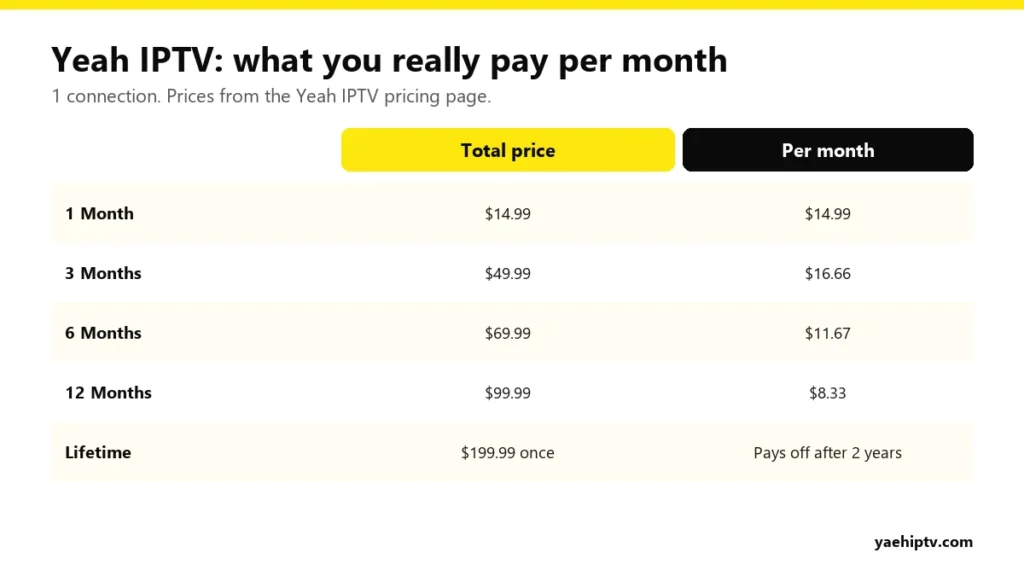
There’s also a lifetime plan: $199.99 once for 1 connection. See the live prices on the Yeah IPTV pricing page.
The real cost per month
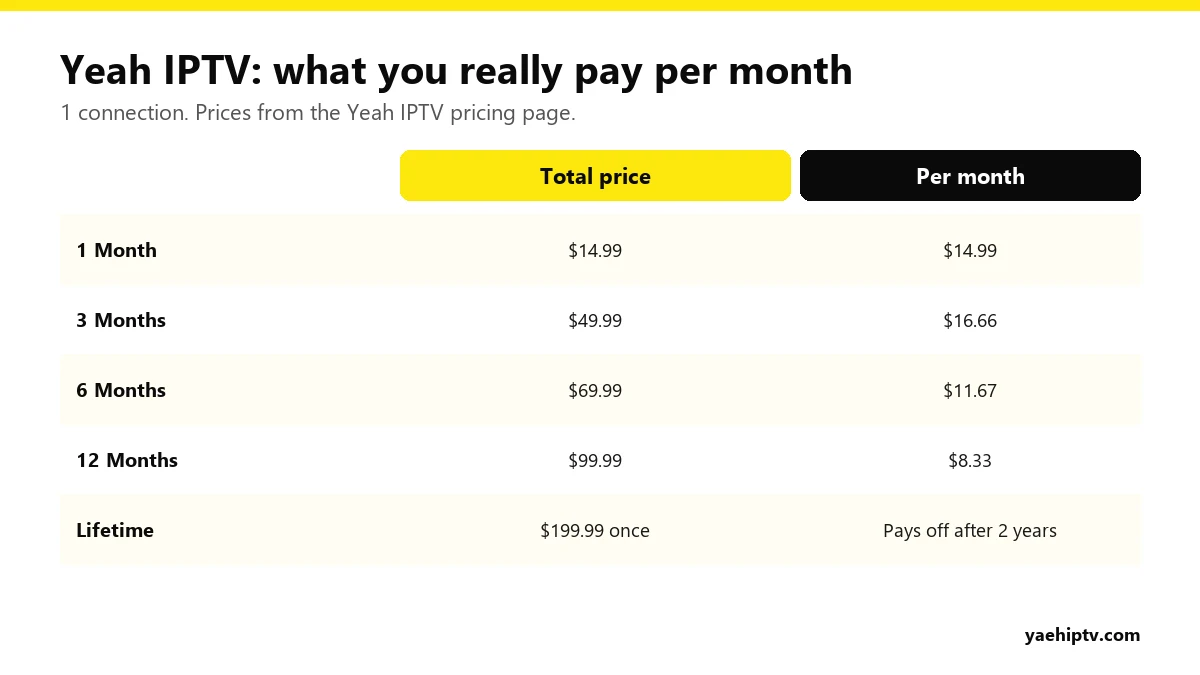
One thing most people miss: for a single connection, the 3-month plan ($16.66 a month) costs more per month than paying monthly ($14.99). If you want to commit for longer, skip it and go straight to 6 months ($11.67 a month) or 12 months ($8.33 a month).
Is the $199.99 lifetime plan worth it?
Compared with the 12-month plan at $99.99 a year, lifetime pays for itself after two years. If you already know you’ll keep the service, that’s a short break-even. If you’re new, use a test or one month first. You can always move up later.
What “Connections” Means
One connection = one screen streaming at a time. You can install your login on the TV, a Firestick and your phone, but with 1 connection only one of them can play at any moment. If a second screen starts, it gets an error or the first one stops.
Quick guide:
- Just you: 1 connection.
- A couple watching different things: 2 connections.
- A family with kids’ TV, living room and bedroom: 3 connections.
Connections are for one household. Sharing a login with other homes can get the account suspended under the terms of use.
What’s Included in Every Plan
- 40,000+ live channels: sports, news, kids and international channels.
- 190,000+ movies and series on demand, updated regularly.
- All PPV events: big fights, matches and special events at no extra charge.
- 4K / FHD / HD on supported channels and content.
- Smart EPG and catch-up, so you can see what’s on and replay what you missed. More in how to use EPG and catch-up.
- 24/7 support for activation and setup.
Devices You Can Use
Yeah IPTV works through a player app on almost any screen: Firestick and Fire TV, Android TV and Google TV, Chromecast with Google TV, Nvidia Shield, Samsung, LG, Sony and Vizio Smart TVs, Apple TV, iPhone and iPad, Windows and Mac, MAG boxes, and even game consoles.
Popular players include TiviMate, IPTV Smarters, VLC and MyTV Online. Device-by-device steps are on the setup guide. Firestick owners can jump to the Firestick install guide, and Smart TV owners to the best Smart TV apps.
How to Get Started
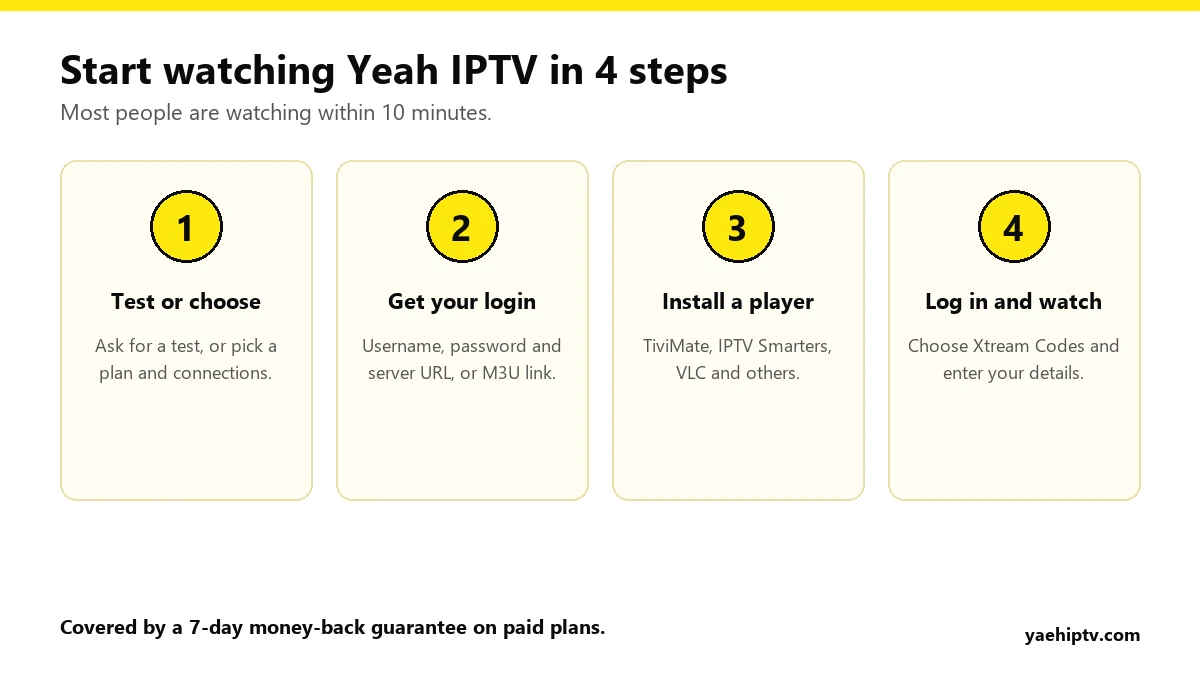
- Request a test or choose a plan. A test lets you check channels, picture quality and your device before you pay for a full plan. Ask on WhatsApp.
- Receive your login: username, password and server URL (Xtream Codes), or an M3U link.
- Install a player on your device.
- Log in with Xtream Codes and wait a few seconds while channels, movies and the guide load. Not sure which login to use? Read M3U vs Xtream Codes.
The 7-Day Money-Back Guarantee
If Yeah IPTV doesn’t meet your expectations, contact support within 7 days of purchase for a full refund. Tests aren’t refundable, and neither are accounts suspended for sharing or reselling. Details are in the refund policy.
Before You Buy: Check Your Internet
Plan on 10 Mbps for HD and 20 Mbps or more for 4K, per screen. A cable beats Wi-Fi for live sports. See what internet speed you need for 4K IPTV.
FAQ
How much is Yeah IPTV per month?
$14.99 for one month with 1 connection. The 12-month plan brings it down to $8.33 a month.
Can I try Yeah IPTV before paying for a plan?
Yes. Request a test on WhatsApp or through the contact form.
How do I pay?
Bitcoin (BTC) and other convenient options. You get clear payment instructions at checkout, including a step-by-step guide if you’ve never bought Bitcoin before. Your account details are sent as soon as payment is confirmed.
Does my plan renew automatically?
No. Yeah IPTV plans don’t renew automatically, so there are no surprise charges. To renew, choose your plan again before it ends and your account is updated.
Can I upgrade later?
Yes. Contact support to add connections or move to a longer period.
Can I watch on two TVs at once?
Yes, with a 2-connection plan or higher, in the same household.
How do I contact Yeah IPTV?
WhatsApp +1 (774) 760-2714 or support@yaehiptv.com, 24/7.
Need help with your IPTV?
Our team is available 24/7 to help you install and use your subscription on any device.
CONTACT US ON WHATSAPP
4 Responses